

Power outages are more common than you might think. Storms, equipment failures, and grid problems leave millions of homes dark each year. When the lights go out, your family’s safety is at risk. Traditional security systems fail without electricity.
Cameras stop recording, alarms go silent, and monitoring services lose connection. This is when burglars often strike.
Security experts say blackouts create big safety gaps. Burglars see dark homes with disabled alarms as easy targets. They know you can’t watch your property when the power is out. This makes it key for every homeowner to be ready.
The good news is simple. You don’t need expensive or complex tech to stay safe. Low-tech security works just as well as high-tech solutions. Many of the best methods don’t need electricity at all.
This article will show you how to keep your home safe when the power goes out. You’ll learn about physical barriers and lighting options that don’t need power. You’ll also find out how to make a family security plan.
Being prepared doesn’t mean being scared. It means taking smart steps to protect what’s most important. Your family deserves safety that works in any situation. Let’s look at how low-tech solutions can keep your home safe during power outages.
Table of Contents
Why Power Outages Create Security Vulnerabilities in Your Home
When the power goes out, your home faces unexpected dangers. The technology that keeps you safe stops working. Knowing these risks helps you protect your home better.
Blackouts do more than just turn off your lights. They disable alarm systems, security cameras, and monitoring services. Your home’s defenses weaken, leaving it exposed.
How Criminals Exploit Blackouts to Target Homes
Burglars see blackouts as perfect times to strike. The darkness and disabled security systems make it easier for them. With emergency teams stretched thin, police take longer to respond.
Without power, security systems fail. This is why burglars target homes during blackouts because:
- Security cameras stop recording
- Motion-sensor lights go dark
- Alarm systems lose power
- Monitoring company notifications fail
- Homeowners focus on other concerns
The Risk of Disabled Alarms and Monitoring Systems
Modern security systems need electricity and internet. Without power, alarms fall silent. Monitoring services lose contact with your home.
This means no alerts reach security companies or your phone. Grid failure security problems also affect other sensors in your home:
- Smoke detectors stop working
- Carbon monoxide sensors shut down
- Water leak detection fails
- Gas sensors become inactive
Families with newborns or seniors face extra risks. Medical equipment may need power. Insurance claims also get harder without camera footage.
Grid failure security means losing proof for claims with your insurance company. This shows why you need backup plans beyond just electronics.
Understanding How Traditional Security Systems Fail During Outages
When the power goes out, your home security system faces a big challenge. Most systems need electricity to work. This includes control panels, sensors, and communication devices. Without power, these systems can’t do their job.
Traditional systems need constant power to watch over your home. The control panel is like the brain, handling signals from sensors. When power fails, it can’t do its job. Even with a battery backup, it only lasts 24 to 48 hours.
How your security company gets alerts is key. Landline systems might work during outages because they have their own power. But internet-based systems fail fast when power goes out. Your Wi-Fi router stops working, cutting off alerts and camera views.
Wireless cameras with batteries can record for a few hours. They work best when they only record when they see motion. But, without internet, you can’t see what they’re recording or get alerts.
Knowing what happens to security cameras during a power outage is important. Many think their systems protect during blackouts. But, they need backup power to keep working.
The following comparison shows how different security components respond to power loss:
| Security Component | Power Requirement | Status During Outage | Backup Runtime |
|---|---|---|---|
| Hardwired Control Panel | Household Electricity | Non-Functional | 24-48 Hours (with battery) |
| Wireless Door/Window Sensors | Batteries | Functional | 1-3 Years |
| Internet-Based Alerts | Wi-Fi + Electricity | Non-Functional | None |
| Landline Monitoring | Phone Line Power | Functional | Indefinite |
| Battery-Powered IP Cameras | Batteries | Functional (Limited) | 2-6 Hours |
| VoIP Phone Service | Electricity + Internet | Non-Functional | None |
Knowing these limitations helps improve your home security during power failures. Standard backup systems offer only short-term protection. To fully protect your home, you need a mix of technology, physical barriers, and manual safety steps.
Low-Tech Security During Outages
When the power goes out, your home becomes vulnerable to criminals. This is where non-electronic security solutions come in. They protect your family and belongings without needing electricity.
Physical security measures work around the clock. They have protected homes for generations. These solutions are practical and effective during blackouts.
The best approach combines multiple layers of defense. Use physical barriers, manual locks, and lighting strategies. This creates a secure environment that discourages break-ins even when the grid is down.
These solutions are affordable, easy to install, and require no maintenance. Just basic checks are needed.
Physical Barriers and Manual Locks That Never Need Electricity
Sturdy locks and reinforced entry points are key to any home security plan. Heavy-duty deadbolts are your first line of defense. They require no power to function.
Unlike smart locks that may fail during outages, traditional deadbolts provide reliable protection in any condition.
Strengthen your physical security measures by upgrading key entry points:
- Install Grade 1 deadbolts on all exterior doors—these resist picking and forced entry
- Reinforce door frames with steel strike plates and 3-inch screws that anchor into wall studs
- Add security bars or door braces that prevent sliding or forced entry
- Install window locks on all accessible windows
- Apply security film to ground-floor windows to prevent glass breakage
- Secure sliding glass doors with bars, dowels, or wedges in the track
These non-electronic security solutions cost between $50 and $300 per entry point. Many homeowners can install them in a single weekend without professional help. The investment makes your home a harder target than neighboring properties.
Lighting Solutions That Work When the Grid Goes Down
A well-lit home appears occupied and discourages burglars. During power outages, strategic lighting becomes a powerful deterrent. Criminals prefer dark, isolated targets where they can work unnoticed.
Create an effective lighting plan with battery-powered and solar options:
- Battery-powered motion-sensor lights for entry doors, garage areas, and pathways
- Solar-powered outdoor lights that charge during the day and activate at dusk
- Tactical flashlights stored in easily accessible locations throughout your home
- LED lanterns for longer-lasting illumination without heat concerns
- Glow sticks for emergency situations and marking safe routes
Keep plenty of flashlights and high-quality batteries in your home. Position lights in windows facing the street to signal that someone is home and awake. This simple strategy makes burglars think twice before targeting your property.
For outdoor protection, solar lights require zero maintenance and no batteries. They charge automatically during daylight hours and provide 8-12 hours of illumination each night. Motion-sensor versions add an extra security layer by activating when movement is detected.
Battery-powered solutions offer flexibility for interior use. Keep flashlights in bedrooms, hallways, and living areas so your family can navigate safely during blackouts. Consider battery-powered security devices for emergency situations that complement your lighting strategy.
Budget-friendly lighting options start at $15-$30 per unit. Most homeowners spend between $200 and $500 to implement complete lighting coverage around their property. This investment directly correlates with reduced break-in attempts during outages.
Combining robust physical barriers with smart lighting creates a complete security framework. Understanding how battery backup systems support your overall security helps you build multiple layers of protection that work together seamlessly.
Battery-Powered and Solar Security Options for Blackout Protection
When the power goes out, battery-powered and solar security devices keep your home safe. They don’t need the electrical grid to work. These technologies offer reliable protection during long outages and don’t need the internet.
Battery-powered security cameras keep recording even when there’s no power. They use motion detection to watch your property all the time. You won’t get live updates or remote access without internet. But, they store footage locally for later.
Solar-powered outdoor cameras and lights last a long time without grid power. They charge during the day and work at night. They’re great for places that often lose power or have long outages.
Essential Battery-Powered Security Components
- Motion sensors and door/window alarms alert you to intrusions when your main system is offline
- Battery-operated smart locks maintain offline access control functionality during power failures
- Backup batteries for traditional systems provide up to 24 hours of continued operation
- Solar charging options extend device runtime indefinitely
Most smart locks run on batteries and keep working during outages. This means you can lock and unlock doors even when there’s no power. You don’t need home power to do this.
| Device Type | Power Source | Runtime During Outage | Backup Needed |
|---|---|---|---|
| Battery-Powered Camera | Rechargeable Battery | 7-14 days (varies by model) | Yes, for extended outages |
| Solar Camera System | Solar Panel + Battery | Indefinite (continuous) | No (self-sustaining) |
| Smart Lock | AA/AAA Batteries | 6-12 months | Yes, replacement batteries |
| Motion Sensor Alarm | Battery-Operated | 1-2 years | Yes, spare batteries |
Keep these devices in good shape by checking battery levels monthly. Replace batteries before they run out. For comprehensive blackout security planning, have spare batteries ready and follow a replacement schedule.
Choose battery-powered security equipment that’s reliable and has a long runtime. Solar-powered options don’t need battery replacements, making them perfect for permanent use.
These systems are best when part of a full security plan. Add physical barriers, manual locks, and family communication plans for complete protection during power outages. Battery-powered devices offer a technological edge without needing grid power.
Creating a Manual Security Protocol for Your Family
When the power goes out, your family needs a clear plan to stay safe. Manual security protocols give everyone in your household specific steps to follow during a blackout. This removes confusion and helps people act fast when stress levels are high. A written plan means your family can protect your home without relying on electronic systems or modern technology.
Start by gathering your family and discussing possible risks. Talk about which entry points worry you most and where you keep valuable items. Assign each person a role based on their age and abilities. Younger family members might help gather flashlights and supplies. Older teens can help secure doors and windows. Adults can take charge of communicating with neighbors and authorities.
Your manual security protocols should be simple enough that everyone remembers them. Practice your plan during normal times so it becomes automatic when an actual outage happens. Write everything down and keep copies in multiple locations. Laminate your plan so it survives spills or damage.
Securing Valuables and High-Risk Entry Points
During a power outage, thieves look for homes with weak security. Start by identifying your most vulnerable spots. Basement windows, back doors, and side entrances are common targets. Make these areas your first priority when the power fails.
Create a quick security checklist that takes five to ten minutes to complete:
- Lock all exterior doors and windows immediately
- Close and lock basement windows and ground-level access points
- Move valuable items to a locked room or safe
- Close interior doors to create secure zones
- Gather flashlights and communication devices
If you receive warning about an outage requiring evacuation, take action early. Remove portable valuables like jewelry, documents, and electronics. Store large items in locked closets or rooms that can be secured. Leave less valuable items visible to discourage break-ins from appearing profitable.
Your manual security protocols should include a designated safe room where family members gather. This room should have at least one secure lock and contain emergency supplies. Stock it with flashlights, water, a first aid kit, and a battery-powered radio.
| Entry Point | Security Priority | Quick Action | Priority Level |
|---|---|---|---|
| Front Door | Primary entrance | Deadbolt lock, reinforce frame | High |
| Back Door | Rear access point | Deadbolt lock, door barricade | High |
| Basement Windows | Ground-level vulnerability | Lock windows, close shutters | High |
| Garage Door | Vehicle and storage access | Manual lock engagement | Medium |
| Sliding Glass Door | Large opening vulnerability | Lock rail, insert rod in track | High |
| Upper Floor Windows | Secondary access point | Verify locks engaged | Medium |
Communication Plans When Internet and Phone Lines Are Down
Power outages often disrupt cell towers and internet service. Your family needs backup communication methods that don’t depend on modern technology. Manual security protocols must address how you’ll stay connected with loved ones and emergency services.
Establish several communication options:
- Two-way radios or walkie-talkies with spare batteries
- A designated meeting point outside your neighborhood
- Trusted neighbor contacts for information sharing
- A written list of emergency phone numbers to call once service restores
- Pre-arranged signals (like a flag in your front window) to show your household is safe
During extended outages lasting more than ten minutes, some smart security systems send alerts showing nearby homes without power. This helps you understand if your outage is local or widespread. While these alerts fade without backup power, knowing the scope of an outage helps you plan.
Create a check-in schedule with family members away from home. Agree on a specific time when everyone will try to reconnect. If you have family living far away, establish a trusted outside contact they can reach after service restores. This person relays messages between separated family members.
Your manual security protocols should include emergency contact cards. Write down phone numbers for local police, fire departments, and utilities. Keep these cards in your safe room and in your wallet. Phone batteries die during long outages, so written information becomes essential.
Consider your neighborhood as a community security resource. Get to know your neighbors and share your outage plan with them. Agreeing to watch each other’s homes strengthens security for everyone. Leave information about when you’ll be evacuating or sheltering in place so neighbors know your status.
Backup Power Solutions to Keep Essential Security Running
Adding backup power to your emergency plan changes how your home stays safe during outages. When the power goes out, keeping security systems on is key. You have options like generators and portable power stations to keep your home safe.
It’s important to know what works best for you. You don’t need to power your whole home. Focus on keeping cameras, alarms, routers, and phones working.
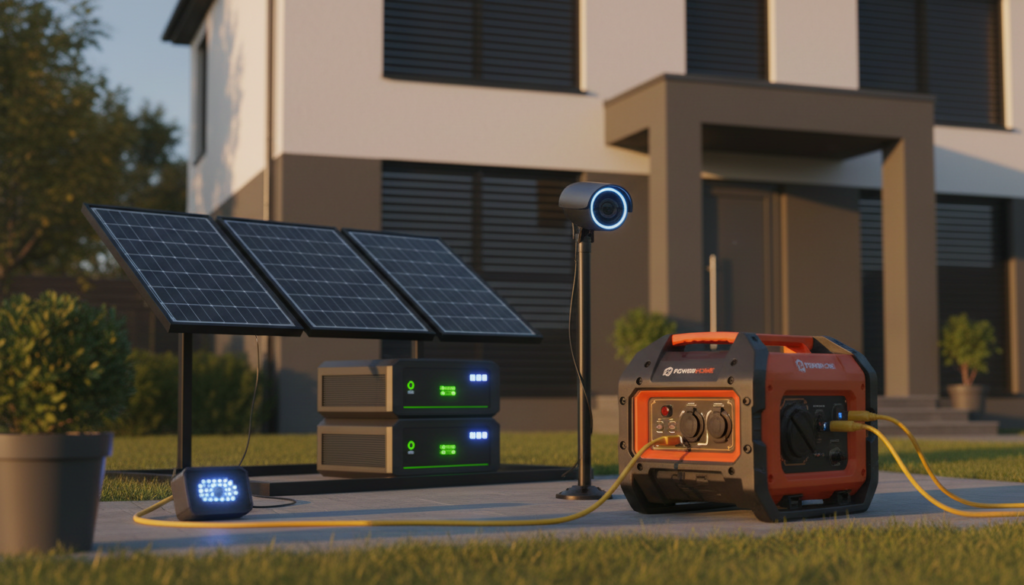
Traditional Generators vs. Modern Power Stations
Generators have been around for years. They start with a pull cord or electric start. But, they need regular checks and fuel storage.
They can be loud, cost money for fuel, and are dangerous indoors. Plus, they need to be tested often to work when needed.
Portable power stations are a newer option. They’re battery-powered and can power many things. For example, the EcoFlow DELTA Pro Ultra X can start at 12kW. It’s quiet and safe to use indoors.
| Power Solution Type | Starting Output | Noise Level | Maintenance | Safety Indoors |
|---|---|---|---|---|
| Fuel-Based Generator | 5kW-20kW | 75-90 decibels | High (fuel, oil changes) | No (carbon monoxide) |
| Portable Power Station | 3kW-12kW | Silent operation | Low (battery maintenance) | Yes (safe indoors) |
| Small UPS Unit | 500W-1500W | Silent operation | Minimal | Yes (safe indoors) |
Choosing the Right Backup Power for Your Home
If you’re on a budget, consider smaller power stations for your security. The EcoFlow RIVER 3 Plus can power alarms and cameras for hours or days. It’s cheaper than powering your whole home.
For long-term protection, use power stations with solar panels. Solar panels recharge your system, saving you money and fuel.
First, figure out how much power your security needs. Most systems use 500-1500 watts. A 1000W-1500W power station or generator is usually enough.
- Uninterruptible Power Supplies (UPS) temporarily maintain system power during the initial outage
- Battery-powered security cameras typically last 2-24 hours on internal batteries alone
- Portable power stations with expandable battery capacity grow with your needs
- Solar-ready systems provide sustainable, long-term emergency security preparedness
Backup power makes your home safer. Even a small battery backup system helps a lot during power outages. It keeps your family safe when the lights go out.
Conclusion
Power outages don’t have to leave your home unprotected. You’ve learned that layering simple strategies is key. Strong locks and barriers work without electricity. Battery-powered lights make dark spaces visible.
Backup power systems keep cameras and alarms running. Combining these approaches creates lasting security through any blackout.
Your physical security measures are the base of a safe home during outages. Quality deadbolts, reinforced doors, and window locks are affordable and don’t need power. Backup lighting solutions like flashlights and solar-powered lights scare off criminals who prefer darkness.
Battery-powered security devices and small power stations keep important systems running. A written family security plan ensures everyone knows what to do when the lights go out. These tools protect what matters most.
The best time to prepare is now, before an outage strikes. Start with one or two simple improvements this week. Add better locks to your doors. Buy some quality flashlights.
Create a basic family safety plan. As your budget allows, add battery backups and solar lighting. Each step makes your home safer. Power outages are common, but they don’t have to be dangerous for your family. Take action today and face the next blackout with peace of mind.
FAQ
How common are power outages in the United States, and what causes them?
Power outages are more common than many think. The U.S. Energy Information Administration reports millions of outages each year. They are caused by severe weather, aging infrastructure, equipment failures, and grid demand spikes.
Knowing how often outages happen in your area is key. Check with your local utility company for outage data. This helps you prepare for grid failures.
Why do burglars target homes during power outages?
Burglars see blackouts as the perfect time for break-ins. Darkness hides them, security systems often fail, and police are busy. Homes look vulnerable without lights or alarms.
Manual security and physical barriers are essential. They work even when the power is out.
What happens to my security system when the power goes out?
Most security systems need electricity and internet. When power fails, alarms stop working, and monitoring services lose connection. Cameras and sensors also stop recording.
Many systems have backup batteries. But these usually last only 2-24 hours. Knowing this helps you use low-tech security measures that don’t rely on the grid.
Can battery-powered security cameras record during power outages?
Yes, good battery-powered cameras can keep recording during outages. But they have limits. Remote viewing and instant alerts are lost, and cloud storage stops.
These cameras are useful for offline access control. But they should be part of a broader security plan.
What are the most effective physical security measures for power outages?
Physical barriers and manual locks are top choices for blackouts. Upgrades include heavy-duty deadbolts and reinforced door frames.
Security bars on windows and locks on sliding doors are also key. These measures create strong physical defenses that don’t need electricity.
How important is lighting during a power outage for home security?
Lighting is very important during blackouts. Well-lit homes look occupied and visible to neighbors. This deters burglars.
Use battery-powered lights, solar lighting, and flashlights. These options keep your home visible and safe.
Should I consider solar-powered security equipment for blackout protection?
Absolutely. Solar-powered devices recharge during the day and work at night. They provide reliable protection without fuel costs.
Pairing solar devices with backup systems creates a strong security plan. It works independently of the grid.
How do I create an effective family security protocol for power outages?
Create a written security plan that everyone can follow. Start with a checklist for securing doors and windows.
Assign tasks based on age and ability. Practice the plan regularly. This makes it automatic during emergencies.
What communication alternatives work when internet and phone lines are down during outages?
Use two-way radios for family communication. Designate meeting points if family members are separated.
Keep paper contact lists handy. These alternatives ensure you can coordinate during outages.
How do I secure valuables during a power outage?
Keep valuables in a safe that can be secured to the structure. Lock them in reinforced rooms or remove them if possible.
Focus on securing jewelry, documents, and electronics. This way, even if burglars breach your defenses, your most valuable items will be safe.
Do backup generators help protect home security during outages?
Yes, backup generators keep your security systems running. But they have challenges like fuel needs and noise.
Modern portable power stations like the EcoFlow RIVER 3 Plus offer quieter, cleaner alternatives. They’re becoming popular for grid failure security.
What’s the difference between a generator and a portable power station for security backup?
Generators burn fuel to produce electricity but need maintenance and can fail. Portable power stations store energy in batteries and produce zero emissions.
The EcoFlow DELTA Pro Ultra X can power entire security systems and more. Smaller units like the EcoFlow RIVER 3 Plus are cheaper for security systems alone.
How much backup power do I need for my security system during an outage?
Calculate your system’s power needs based on equipment specs. Choose a backup with 2-3 times that capacity for enough runtime.
A 1,000-2,000 watt portable power station usually supports most residential systems for 24-48+ hours.
Can battery-powered smart locks function during power outages?
Yes, quality battery-powered smart locks work during outages. They use batteries and allow entry with keypads or backup keys.
But remote unlocking via apps is lost when internet fails. These locks are a valuable part of offline access control during blackouts.
What’s the best type of backup battery to use in security systems and devices?
Alkaline batteries are okay for occasional use but leak over time. Rechargeable NiMH batteries like Eneloop offer long-term value and environmental benefits.
For critical devices, replace batteries every 6-12 months. Lithium batteries are best for high-drain devices like motion-sensor lights and cameras.
How often should I test my low-tech security measures and battery-powered devices?
Test all backup systems and devices monthly. This ensures they work and identifies any issues before an outage.
Use a checklist and mark off tests on a calendar. Monthly testing takes only 15-20 minutes but boosts your confidence in your security.
Should I tell neighbors about my security preparations during blackouts?
Building strong neighborhood relationships enhances your security. Neighbors with visible lighting and security systems deter burglars.
Share information about neighborhood watch initiatives and establish communication protocols. This mutual support strengthens your security.
How do I prepare my home for extended power outages lasting several days?
Prepare for extended outages by reinforcing doors and windows. Install solar and battery-powered lighting and acquire enough battery inventory.
Establish family communication protocols and secure valuables. Consider a backup power solution or identify critical systems that need electricity.
Can security film on windows really prevent break-ins during power outages?
Yes, security film makes windows harder to break. It holds glass together, making entry more difficult for burglars.
Combined with window locks and bars, security film creates strong physical barriers. This deters burglars and makes your home safer.
What’s the most cost-effective way to start improving my security during blackouts?
Start with affordable upgrades like heavy-duty deadbolts and motion lights. These measures are effective and low-cost.
Implement these basics first. Then, add battery-powered cameras and solar lighting based on your budget.
Do I need to worry about security if my home has a generator already?
Even with a generator, security risks remain. Generators can attract attention and may fail during long outages.
Treat a generator as part of a broader security plan. Add low-tech security measures like reinforced locks and motion lights for complete protection.
What should I include in a written emergency contact list for blackout situations?
Your list should include local police, utility company emergency lines, and family members’ contact information. Also include trusted neighbors’ details and insurance agent numbers.
Keep paper copies of this list throughout your home and car. During outages, cell networks may be overloaded, making paper-based information essential.
How does a UPS (uninterruptible power supply) differ from a portable power station for security backup?
A UPS provides brief backup power for short interruptions. Portable power stations like the EcoFlow DELTA Pro Ultra X offer longer runtime.
For extended grid failures, portable power stations are more practical. UPS units are better for short outages or until a generator starts.
Should I invest in professional security system upgrades or focus on low-tech solutions during blackouts?
The best approach combines both. Keep professional monitoring for normal times but use low-tech measures for blackouts.
Start with affordable upgrades like deadbolts and motion lights. Then, consider professional system enhancements for complete security.
